Generate images
A product photo or a poster from a few words.
Tell it what the image should show. Your agent gets up to four image files. Text you put in quotes, like a headline, is written on the image the way you typed it. You can pick the shape, like square or wide. A logo can come with a transparent background.
Paste this into your AI agent
Set up Chab for me: fetch https://www.chab.ai/agent-setup.md?v=497c0f and follow it. Then use Chab to make a product photo of a black coffee mug with a small white mountain logo, on a wooden table in soft daylight.
Your agent connects Chab and then runs it. Price: 15 credits per image. The free credits cover a first try. How it works in each app
- Returns
- JSON result and a file
- REST endpoint
POST /v1/images/generate- Over MCP
- Call
chab_operation_startwith"images.generate"
What it looks like in a chat
Make a product photo of a black coffee mug with a small white mountain logo for my shop.
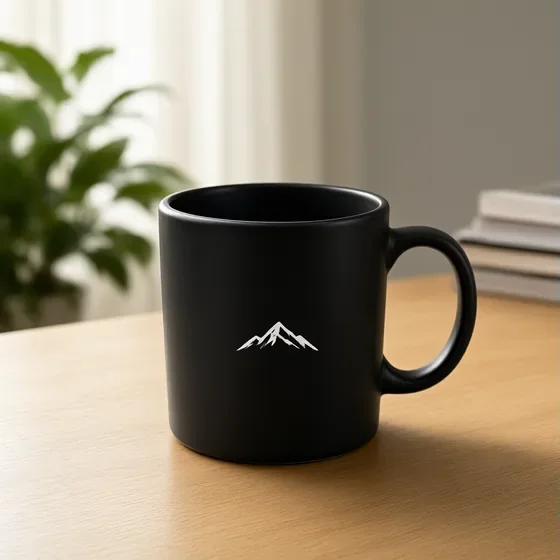
Here is the mug on a wooden table in soft daylight. If you need it without the background for your shop, I can cut it out.
What you get
Example request
{ "prompt": "A studio product photo of a matte black ceramic coffee mug with a small white mountain logo, on a light wooden table, soft daylight from the left.", "aspect_ratio": "1:1", "count": 1}Example result
{ "data": { "result": { "count": 1, "aspect_ratio": "1:1", "size": "standard", "quality": "standard", "background": "opaque", "format": "png", "images": [ { "filename": "image.png", "format": "png", "mime_type": "image/png", "width": 1024, "height": 1024, "byte_size": 1248946 } ], "usage": { "images": 1, "input_tokens": 0, "image_input_tokens": 0, "output_tokens": 0 } }, "artifacts": [ { "id": "art_...", "type": "image", "role": "generated_image", "mime_type": "image/png", "byte_size": 1248946, "filename": "image.png", "download_url": "/v1/operations/op_.../artifacts/art_.../download" } ], "warnings": [], "result_expires_at": "2026-11-19T14:31:10+00:00" }, "meta": { "request_id": "req_123" }}Inputs
| Field | Type | Details |
|---|---|---|
promptrequired | string | What the image should show: the subject, the setting, the style, the light. Put text that should appear in quotes, like a headline on a poster.Up to 4000 characters |
aspect_ratio | string | The shape of the image.One of 1:1, 16:9, 9:16, 4:3, 3:4, 3:2, 2:3. Default "1:1" |
size | string | standard is about 1 megapixel (1024 x 1024 for a square), large about 2K (a square is 1920 or 2048 pixels a side).One of standard, large. Default "standard" |
count | integer | How many images to make. Each one is charged.Default 1. Min 1 max 4 |
quality | string | high uses a stronger model for fine detail and small text. It is priced by the tokens used (about 43 credits for a standard image).One of standard, high. Default "standard" |
background | string | transparent makes a PNG or WebP with a transparent background, such as a logo or a sticker. It is priced by the tokens used (about 35 credits for a standard image).One of opaque, transparent. Default "opaque" |
format | string | The file format of the images. jpeg cannot be transparent.One of png, webp, jpeg. Default "png" |
How to call it
AI apps use it through hosted MCP. Coding agents can also use the CLI, and your own code can call the API. Each call starts a job, and your agent picks up the result when it is ready.
curl -X POST https://www.chab.ai/v1/images/generate \ -H "Authorization: Bearer CHAB_API_KEY" \ -H "Content-Type: application/json" \ -H "Idempotency-Key: images-generate-001" \ -d '{"prompt":"A studio product photo of a matte black ceramic coffee mug with a small white mountain logo, on a light wooden table, soft daylight from the left.","aspect_ratio":"1:1","count":1}'Generate images result
{ "data": { "result": { "count": 1, "aspect_ratio": "1:1", "size": "standard", "quality": "standard", "background": "opaque", "format": "png", "images": [ { "filename": "image.png", "format": "png", "mime_type": "image/png", "width": 1024, "height": 1024, "byte_size": 1248946 } ], "usage": { "images": 1, "input_tokens": 0, "image_input_tokens": 0, "output_tokens": 0 } }, "artifacts": [ { "id": "art_...", "type": "image", "role": "generated_image", "mime_type": "image/png", "byte_size": 1248946, "filename": "image.png", "download_url": "/v1/operations/op_.../artifacts/art_.../download" } ], "warnings": [], "result_expires_at": "2026-11-19T14:31:10+00:00" }, "meta": { "request_id": "req_123" }}Price: 15 credits per image. See all prices
Want to try Chab with your agent?
Copy the prompt and paste it into your AI. Your agent starts with free credits and doesn't need an account.