Edit an image
Change a photo with a few words, or cut out its background.
Send an image or a link to one and say what to change. The rest of the image stays as it is. You can add up to three more images, like a logo to put on a shirt. To change only one part, send a mask that marks it. Chab can also cut out the main subject and give you a PNG with a transparent background.
Paste this into your AI agent
Set up Chab for me: fetch https://www.chab.ai/agent-setup.md?v=497c0f and follow it. Then use Chab to cut out the cup in this photo and give me a PNG with a transparent background: https://upload.wikimedia.org/wikipedia/commons/4/45/A_small_cup_of_coffee.JPG
Your agent connects Chab and then runs it. Price: 15 credits per image. The free credits cover a first try. How it works in each app
- Returns
- JSON result and a file
- REST endpoint
POST /v1/images/edit- Over MCP
- Call
chab_operation_startwith"images.edit"
What it looks like in a chat
Cut out the mug in this photo. I need it on a transparent background for my shop.
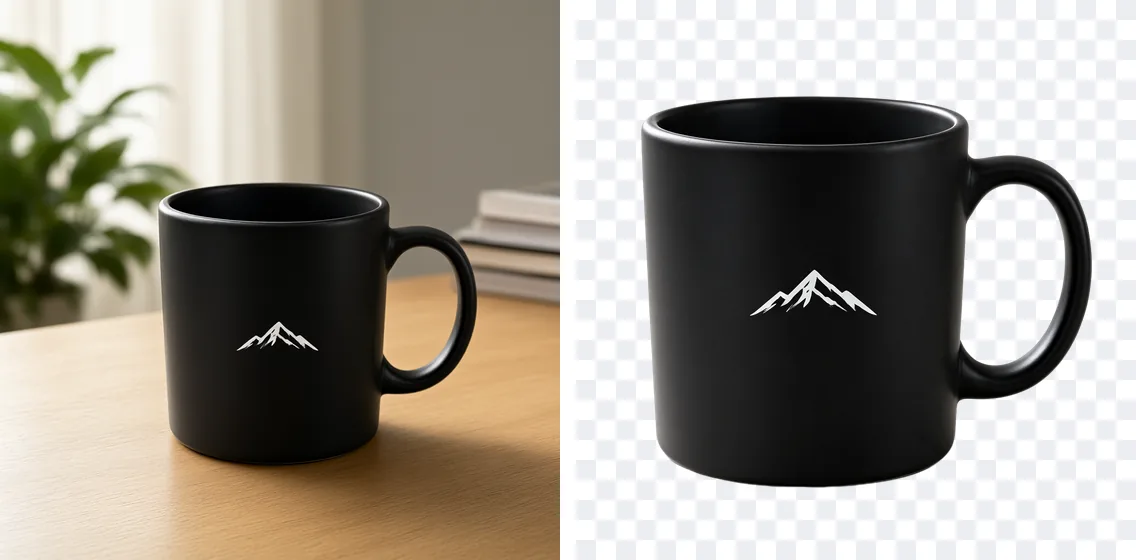
Done. The mug on the right is a PNG with a transparent background. The photo on the left is the one you sent.
What you get
Example request
{ "image": { "type": "url", "url": "https://upload.wikimedia.org/wikipedia/commons/4/45/A_small_cup_of_coffee.JPG" }, "remove_background": true}Example result
{ "data": { "result": { "source": { "type": "url", "url": "https://upload.wikimedia.org/wikipedia/commons/4/45/A_small_cup_of_coffee.JPG", "filename": "A_small_cup_of_coffee.JPG", "format": "jpeg", "byte_size": 401623 }, "references": 0, "mask": false, "remove_background": true, "count": 1, "aspect_ratio": "4:3", "size": "standard", "quality": "standard", "background": "transparent", "format": "png", "images": [ { "filename": "A_small_cup_of_coffee-no-background.png", "format": "png", "mime_type": "image/png", "width": 1110, "height": 832, "byte_size": 2387051 } ], "usage": { "images": 1, "input_tokens": 0, "image_input_tokens": 0, "output_tokens": 0 } }, "artifacts": [ { "id": "art_...", "type": "image", "role": "generated_image", "mime_type": "image/png", "byte_size": 2387051, "filename": "A_small_cup_of_coffee-no-background.png", "download_url": "/v1/operations/op_.../artifacts/art_.../download" } ], "warnings": [], "result_expires_at": "2026-11-19T14:42:27+00:00" }, "meta": { "request_id": "req_123" }}Inputs
| Field | Type | Details |
|---|---|---|
imagerequired | object | The image to change: an uploaded file (file_id), a reusable artifact such as an images.generate image or a screenshot (artifact_id), or a public https URL (url). PNG, JPEG, WebP or HEIC. |
image.typerequired | string | One of file_id, artifact_id, url |
image.id | string | The fil_ or art_ id, with type file_id or artifact_id.Up to 64 characters |
image.url | string | A public https URL of the image, with type url. Chab downloads it (up to your plan's upload size) and checks it for viruses like an upload.Up to 2048 characters |
references | array of object | Up to 3 more images the prompt can refer to, such as a logo to put on the image. The image to change is the first image, the references are the second, third and fourth. |
mask | object | Where to change the image: a PNG whose transparent parts (or, without transparency, white parts) mark the area. It is scaled to the size of the image. An edit with a mask is priced by the tokens used. |
mask.typerequired | string | One of file_id, artifact_id, url |
mask.id | string | The fil_ or art_ id, with type file_id or artifact_id.Up to 64 characters |
mask.url | string | A public https URL of the image, with type url. Chab downloads it (up to your plan's upload size) and checks it for viruses like an upload.Up to 2048 characters |
prompt | string | What to change, such as "Make the mug red" or "Put the logo from the second image on the shirt". Required unless remove_background is true.Up to 4000 characters |
remove_background | boolean | Make a PNG of the main subject on a transparent background. The prompt is optional then (it can say what to keep). Makes one image.Default false |
aspect_ratio | string | The shape of the new image. Default: the shape of the image closest to one of these.One of 1:1, 16:9, 9:16, 4:3, 3:4, 3:2, 2:3 |
size | string | standard is about 1 megapixel (1024 x 1024 for a square), large about 2K (a square is 1920 or 2048 pixels a side).One of standard, large. Default "standard" |
count | integer | How many images to make. Each one is charged.Default 1. Min 1 max 4 |
quality | string | high uses a stronger model for fine detail and small text. It is priced by the tokens used (about 43 credits for a standard image).One of standard, high. Default "standard" |
background | string | transparent makes a PNG or WebP with a transparent background, such as a logo or a sticker. It is priced by the tokens used (about 35 credits for a standard image).One of opaque, transparent. Default "opaque" |
format | string | The file format of the images. jpeg cannot be transparent.One of png, webp, jpeg. Default "png" |
How to call it
AI apps use it through hosted MCP. Coding agents can also use the CLI, and your own code can call the API. Each call starts a job, and your agent picks up the result when it is ready.
curl -X POST https://www.chab.ai/v1/images/edit \ -H "Authorization: Bearer CHAB_API_KEY" \ -H "Content-Type: application/json" \ -H "Idempotency-Key: images-edit-001" \ -d '{"image":{"type":"url","url":"https://upload.wikimedia.org/wikipedia/commons/4/45/A_small_cup_of_coffee.JPG"},"remove_background":true}'Edit an image result
{ "data": { "result": { "source": { "type": "url", "url": "https://upload.wikimedia.org/wikipedia/commons/4/45/A_small_cup_of_coffee.JPG", "filename": "A_small_cup_of_coffee.JPG", "format": "jpeg", "byte_size": 401623 }, "references": 0, "mask": false, "remove_background": true, "count": 1, "aspect_ratio": "4:3", "size": "standard", "quality": "standard", "background": "transparent", "format": "png", "images": [ { "filename": "A_small_cup_of_coffee-no-background.png", "format": "png", "mime_type": "image/png", "width": 1110, "height": 832, "byte_size": 2387051 } ], "usage": { "images": 1, "input_tokens": 0, "image_input_tokens": 0, "output_tokens": 0 } }, "artifacts": [ { "id": "art_...", "type": "image", "role": "generated_image", "mime_type": "image/png", "byte_size": 2387051, "filename": "A_small_cup_of_coffee-no-background.png", "download_url": "/v1/operations/op_.../artifacts/art_.../download" } ], "warnings": [], "result_expires_at": "2026-11-19T14:42:27+00:00" }, "meta": { "request_id": "req_123" }}Price: 15 credits per image. See all prices
Want to try Chab with your agent?
Copy the prompt and paste it into your AI. Your agent starts with free credits and doesn't need an account.